> ## Documentation Index
> Fetch the complete documentation index at: https://docs-v1.agno.com/llms.txt
> Use this file to discover all available pages before exploring further.
# Simple Agent Evals
> Learn how to evaluate your Agno Agents and Teams across three key dimensions - accuracy (using LLM-as-a-judge), performance (runtime and memory), and reliability (tool calls).
**Evals** are unit tests for your Agents and Teams, use them judiciously to measure and improve their performance. Agno provides 3 dimensions for evaluating Agents:
* **Accuracy:** How complete/correct/accurate is the Agent's response (LLM-as-a-judge)
* **Performance:** How fast does the Agent respond and what's the memory footprint?
* **Reliability:** Does the Agent make the expected tool calls?
## Accuracy
Accuracy evals use input/output pairs to measure your Agents and Teams performance against a gold-standard answer. Use a larger model to score the Agent's responses (LLM-as-a-judge).
#### Example
In this example, the `AccuracyEval` will run the Agent with the input, then use a different model (`o4-mini`) to score the Agent's response according to the guidelines provided.
```python calculate_accuracy.py theme={null}
from typing import Optional
from agno.agent import Agent
from agno.eval.accuracy import AccuracyEval, AccuracyResult
from agno.models.openai import OpenAIChat
from agno.tools.calculator import CalculatorTools
evaluation = AccuracyEval(
model=OpenAIChat(id="o4-mini"),
agent=Agent(model=OpenAIChat(id="gpt-4o"), tools=[CalculatorTools(enable_all=True)]),
input="What is 10*5 then to the power of 2? do it step by step",
expected_output="2500",
additional_guidelines="Agent output should include the steps and the final answer.",
)
result: Optional[AccuracyResult] = evaluation.run(print_results=True)
assert result is not None and result.avg_score >= 8
```
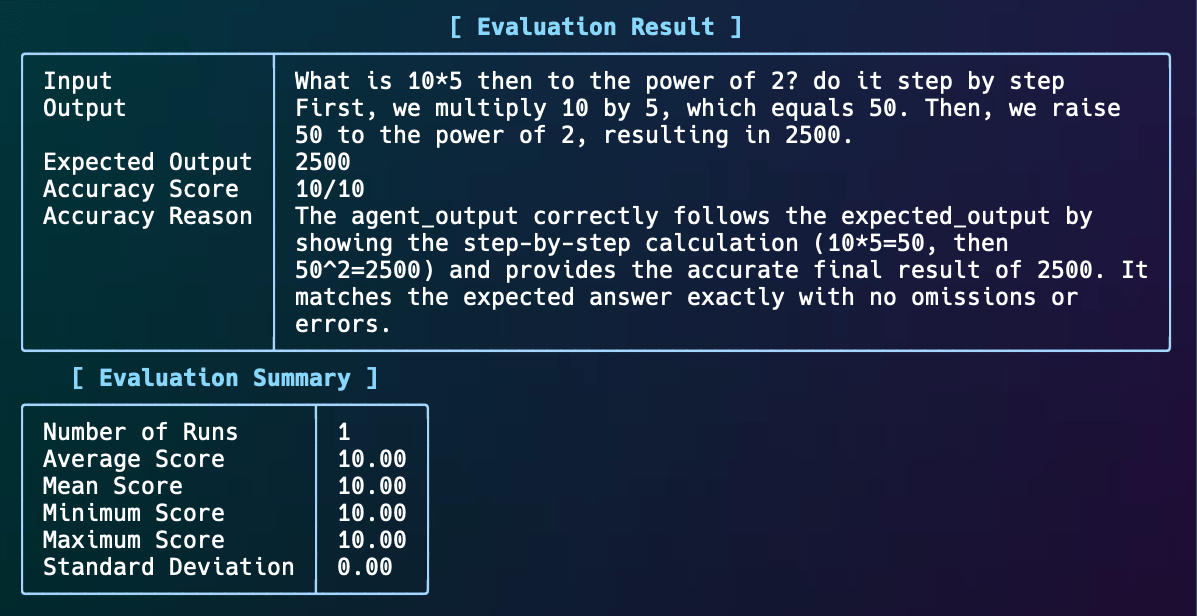 You can also run the `AccuracyEval` on an existing output (without running the Agent).
```python accuracy_eval_with_output.py theme={null}
from typing import Optional
from agno.agent import Agent
from agno.eval.accuracy import AccuracyEval, AccuracyResult
from agno.models.openai import OpenAIChat
from agno.tools.calculator import CalculatorTools
evaluation = AccuracyEval(
model=OpenAIChat(id="o4-mini"),
input="What is 10*5 then to the power of 2? do it step by step",
expected_output="2500",
num_iterations=1,
)
result_with_given_answer: Optional[AccuracyResult] = evaluation.run_with_output(
output="2500", print_results=True
)
assert result_with_given_answer is not None and result_with_given_answer.avg_score >= 8
```
## Performance
Performance evals measure the latency and memory footprint of an Agent or Team.
While latency will be dominated by the model API response time, we should still keep performance top of mind and track the Agent or Team's performance with and without certain components. Eg: it would be good to know what's the average latency with and without storage, memory, with a new prompt, or with a new model.
#### Example
```python storage_performance.py theme={null}
"""Run `pip install openai agno` to install dependencies."""
from agno.agent import Agent
from agno.models.openai import OpenAIChat
from agno.eval.perf import PerfEval
def simple_response():
agent = Agent(model=OpenAIChat(id='gpt-4o-mini'), system_message='Be concise, reply with one sentence.', add_history_to_messages=True)
response_1 = agent.run('What is the capital of France?')
print(response_1.content)
response_2 = agent.run('How many people live there?')
print(response_2.content)
return response_2.content
simple_response_perf = PerfEval(func=simple_response, num_iterations=1, warmup_runs=0)
if __name__ == "__main__":
simple_response_perf.run(print_results=True)
```
## Reliability
What makes an Agent or Team reliable?
* Does it make the expected tool calls?
* Does it handle errors gracefully?
* Does it respect the rate limits of the model API?
#### Example
The first check is to ensure the Agent makes the expected tool calls. Here's an example:
```python reliability.py theme={null}
from typing import Optional
from agno.agent import Agent
from agno.eval.reliability import ReliabilityEval, ReliabilityResult
from agno.tools.calculator import CalculatorTools
from agno.models.openai import OpenAIChat
from agno.run.response import RunResponse
def multiply_and_exponentiate():
agent=Agent(
model=OpenAIChat(id="gpt-4o-mini"),
tools=[CalculatorTools(add=True, multiply=True, exponentiate=True)],
)
response: RunResponse = agent.run("What is 10*5 then to the power of 2? do it step by step")
evaluation = ReliabilityEval(
agent_response=response,
expected_tool_calls=["multiply", "exponentiate"],
)
result: Optional[ReliabilityResult] = evaluation.run(print_results=True)
result.assert_passed()
if __name__ == "__main__":
multiply_and_exponentiate()
```
Reliability evals are currently in `beta`.
You can also run the `AccuracyEval` on an existing output (without running the Agent).
```python accuracy_eval_with_output.py theme={null}
from typing import Optional
from agno.agent import Agent
from agno.eval.accuracy import AccuracyEval, AccuracyResult
from agno.models.openai import OpenAIChat
from agno.tools.calculator import CalculatorTools
evaluation = AccuracyEval(
model=OpenAIChat(id="o4-mini"),
input="What is 10*5 then to the power of 2? do it step by step",
expected_output="2500",
num_iterations=1,
)
result_with_given_answer: Optional[AccuracyResult] = evaluation.run_with_output(
output="2500", print_results=True
)
assert result_with_given_answer is not None and result_with_given_answer.avg_score >= 8
```
## Performance
Performance evals measure the latency and memory footprint of an Agent or Team.
While latency will be dominated by the model API response time, we should still keep performance top of mind and track the Agent or Team's performance with and without certain components. Eg: it would be good to know what's the average latency with and without storage, memory, with a new prompt, or with a new model.
#### Example
```python storage_performance.py theme={null}
"""Run `pip install openai agno` to install dependencies."""
from agno.agent import Agent
from agno.models.openai import OpenAIChat
from agno.eval.perf import PerfEval
def simple_response():
agent = Agent(model=OpenAIChat(id='gpt-4o-mini'), system_message='Be concise, reply with one sentence.', add_history_to_messages=True)
response_1 = agent.run('What is the capital of France?')
print(response_1.content)
response_2 = agent.run('How many people live there?')
print(response_2.content)
return response_2.content
simple_response_perf = PerfEval(func=simple_response, num_iterations=1, warmup_runs=0)
if __name__ == "__main__":
simple_response_perf.run(print_results=True)
```
## Reliability
What makes an Agent or Team reliable?
* Does it make the expected tool calls?
* Does it handle errors gracefully?
* Does it respect the rate limits of the model API?
#### Example
The first check is to ensure the Agent makes the expected tool calls. Here's an example:
```python reliability.py theme={null}
from typing import Optional
from agno.agent import Agent
from agno.eval.reliability import ReliabilityEval, ReliabilityResult
from agno.tools.calculator import CalculatorTools
from agno.models.openai import OpenAIChat
from agno.run.response import RunResponse
def multiply_and_exponentiate():
agent=Agent(
model=OpenAIChat(id="gpt-4o-mini"),
tools=[CalculatorTools(add=True, multiply=True, exponentiate=True)],
)
response: RunResponse = agent.run("What is 10*5 then to the power of 2? do it step by step")
evaluation = ReliabilityEval(
agent_response=response,
expected_tool_calls=["multiply", "exponentiate"],
)
result: Optional[ReliabilityResult] = evaluation.run(print_results=True)
result.assert_passed()
if __name__ == "__main__":
multiply_and_exponentiate()
```
Reliability evals are currently in `beta`.