> ## Documentation Index
> Fetch the complete documentation index at: https://docs-v1.agno.com/llms.txt
> Use this file to discover all available pages before exploring further.
# What are Workflows?
> Learn more about Agno Workflows and why they can be really useful to build a multi-agent system
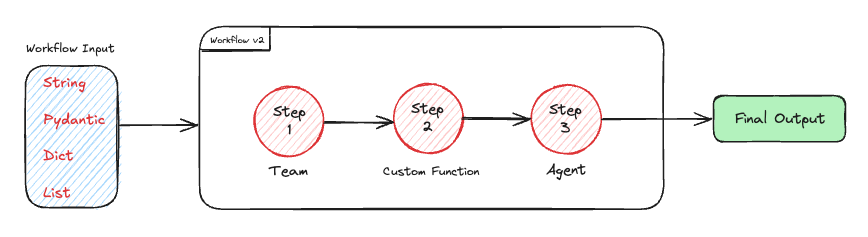
Agno Workflows are designed to automate complex processes by defining a series of steps that are executed in sequence. Each step can be executed by an agent, a team, or a custom function.
 ## Why should you use Workflows?
Workflows are a great way to automate complex processes by defining a series of steps that are executed in a flow that you control. This is particularly useful when you need to:
* Automate a series of tasks
* Orchestrate multiple agents or teams of agents
* Have complex logic where you require agents to run in loops, or in parallel, or route different flows based on the output of previous steps
When building multi-agent systems, there is often a need to control the flow of execution, and this is where Workflows come in. Workflows are best suited for deterministic agent automation, in comparison to [Teams](/teams) which are designed for agentic coordination between agents.
## Step-Wise Controlled Execution
Agno Workflows are fundamentally an execution of a series of steps. These steps are executed in sequence, and the output of each step is passed to the next step.
Each step can be executed by an agent, a team, or a custom Python function. These are individual components that can work independently but gain enhanced capabilities when orchestrated together:
* **Agents**: Individual AI executors with specific capabilities and instructions
* **Teams**: Coordinated groups of agents working together on complex problems
* **Functions**: Custom Python functions for specialized processing logic
The beauty of this approach is that you have access to the full power of Agno Agents and Teams, with the flexibility of a sophisticated orchestration system.
Your agents and teams retain their individual characteristics, memory, and behavior patterns, but now operate within a structured workflow that provides:
* Sequential step execution with output chaining
* Session management and state persistence
* Error handling and retry mechanisms
* Streaming capabilities for real-time feedback
## Workflow Input
Workflows support multiple input types for maximum flexibility:
| Input Type | Example | Use Case |
| ------------------ | ------------------------------------------------- | -------------------------- |
| **String** | `"Analyze AI trends"` | Simple text prompts |
| **Pydantic Model** | `ResearchRequest(topic="AI", depth=5)` | Type-safe structured input |
| **List** | `["AI", "ML", "LLMs"]` | Multiple items to process |
| **Dictionary** | `{"query": "AI", "sources": ["web", "academic"]}` | Key-value pairs |
When this input is passed to an `Agent` or `Team`, it will be serialized to a string before being passed to the agent or team.
See more on Pydantic as input in the [Structured Inputs](/workflows_2/advanced#structured-inputs) documentation.
## Architectural components
1. The **`Workflow`** class is the top-level orchestrator that manages the entire execution process.
2. **`Step`** is the fundamental unit of work in the workflow system. Each step encapsulates exactly one `executor` - either an `Agent`, a `Team`, or a custom Python function. This design ensures clarity and maintainability while preserving the individual characteristics of each executor.
3. **`Loop`** is a construct that allows you to execute one or more steps multiple times. This is useful when you need to repeat a set of steps until a certain condition is met.
4. **`Parallel`** is a construct that allows you to execute one or more steps in parallel. This is useful when you need to execute a set of steps concurrently with the outputs joined together.
5. **`Condition`** makes a step conditional based on criteria you specify.
6. **`Router`** allows you to specify which step(s) to execute next, effectively creating branching logic in your workflow.
When using a custom Python function as an executor for a step, `StepInput` and `StepOutput` provides standardized interfaces for data flow between steps:
## Why should you use Workflows?
Workflows are a great way to automate complex processes by defining a series of steps that are executed in a flow that you control. This is particularly useful when you need to:
* Automate a series of tasks
* Orchestrate multiple agents or teams of agents
* Have complex logic where you require agents to run in loops, or in parallel, or route different flows based on the output of previous steps
When building multi-agent systems, there is often a need to control the flow of execution, and this is where Workflows come in. Workflows are best suited for deterministic agent automation, in comparison to [Teams](/teams) which are designed for agentic coordination between agents.
## Step-Wise Controlled Execution
Agno Workflows are fundamentally an execution of a series of steps. These steps are executed in sequence, and the output of each step is passed to the next step.
Each step can be executed by an agent, a team, or a custom Python function. These are individual components that can work independently but gain enhanced capabilities when orchestrated together:
* **Agents**: Individual AI executors with specific capabilities and instructions
* **Teams**: Coordinated groups of agents working together on complex problems
* **Functions**: Custom Python functions for specialized processing logic
The beauty of this approach is that you have access to the full power of Agno Agents and Teams, with the flexibility of a sophisticated orchestration system.
Your agents and teams retain their individual characteristics, memory, and behavior patterns, but now operate within a structured workflow that provides:
* Sequential step execution with output chaining
* Session management and state persistence
* Error handling and retry mechanisms
* Streaming capabilities for real-time feedback
## Workflow Input
Workflows support multiple input types for maximum flexibility:
| Input Type | Example | Use Case |
| ------------------ | ------------------------------------------------- | -------------------------- |
| **String** | `"Analyze AI trends"` | Simple text prompts |
| **Pydantic Model** | `ResearchRequest(topic="AI", depth=5)` | Type-safe structured input |
| **List** | `["AI", "ML", "LLMs"]` | Multiple items to process |
| **Dictionary** | `{"query": "AI", "sources": ["web", "academic"]}` | Key-value pairs |
When this input is passed to an `Agent` or `Team`, it will be serialized to a string before being passed to the agent or team.
See more on Pydantic as input in the [Structured Inputs](/workflows_2/advanced#structured-inputs) documentation.
## Architectural components
1. The **`Workflow`** class is the top-level orchestrator that manages the entire execution process.
2. **`Step`** is the fundamental unit of work in the workflow system. Each step encapsulates exactly one `executor` - either an `Agent`, a `Team`, or a custom Python function. This design ensures clarity and maintainability while preserving the individual characteristics of each executor.
3. **`Loop`** is a construct that allows you to execute one or more steps multiple times. This is useful when you need to repeat a set of steps until a certain condition is met.
4. **`Parallel`** is a construct that allows you to execute one or more steps in parallel. This is useful when you need to execute a set of steps concurrently with the outputs joined together.
5. **`Condition`** makes a step conditional based on criteria you specify.
6. **`Router`** allows you to specify which step(s) to execute next, effectively creating branching logic in your workflow.
When using a custom Python function as an executor for a step, `StepInput` and `StepOutput` provides standardized interfaces for data flow between steps:
 ## How to make your first workflow?
There are different types of patterns you can use to build your workflows.
For example you can combine agents, teams, and functions to build a workflow.
```python theme={null}
from agno.workflow.v2 import Step, Workflow, StepOutput
def data_preprocessor(step_input):
# Custom preprocessing logic
# Or you can also run any agent/team over here itself
# response = some_agent.run(...)
return StepOutput(content=f"Processed: {step_input.message}") # <-- Now pass the agent/team response in content here
workflow = Workflow(
name="Mixed Execution Pipeline",
steps=[
research_team, # Team
data_preprocessor, # Function
content_agent, # Agent
]
)
workflow.print_response("Analyze the competitive landscape for fintech startups", markdown=True)
```
See the full [example](/examples/workflows_2/01-basic-workflows/sequence_of_functions_and_agents) for more details.
To learn more about how to start building workflow systems, check out the [development guide](/workflows_2/types_of_workflows) page.
## How to make your first workflow?
There are different types of patterns you can use to build your workflows.
For example you can combine agents, teams, and functions to build a workflow.
```python theme={null}
from agno.workflow.v2 import Step, Workflow, StepOutput
def data_preprocessor(step_input):
# Custom preprocessing logic
# Or you can also run any agent/team over here itself
# response = some_agent.run(...)
return StepOutput(content=f"Processed: {step_input.message}") # <-- Now pass the agent/team response in content here
workflow = Workflow(
name="Mixed Execution Pipeline",
steps=[
research_team, # Team
data_preprocessor, # Function
content_agent, # Agent
]
)
workflow.print_response("Analyze the competitive landscape for fintech startups", markdown=True)
```
See the full [example](/examples/workflows_2/01-basic-workflows/sequence_of_functions_and_agents) for more details.
To learn more about how to start building workflow systems, check out the [development guide](/workflows_2/types_of_workflows) page.