> ## Documentation Index
> Fetch the complete documentation index at: https://docs-v1.agno.com/llms.txt
> Use this file to discover all available pages before exploring further.
# Introduction
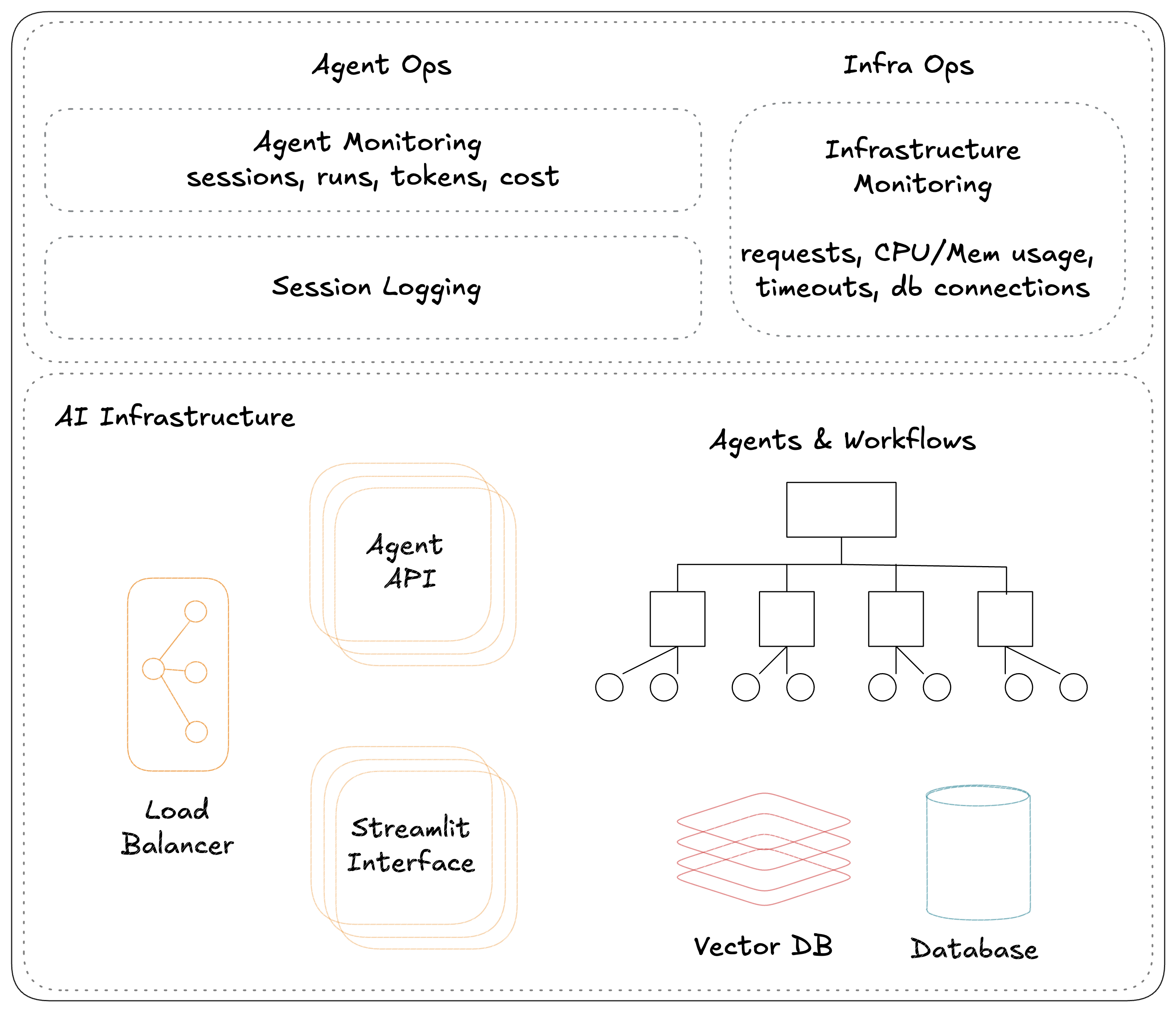
**Agno Workspaces** are standardized codebases for running Agentic Systems locally using Docker and in production on AWS. They help us manage our Agentic System as code.
 ## Create a new workspace
Run `ag ws create` to create a new workspace, the command will ask your for a starter template and workspace name.
```bash Create Workspace theme={null}
ag ws create
```
```bash Create Agent App theme={null}
ag ws create -t agent-app-aws -n agent-app
```
```bash Create Agent API theme={null}
ag ws create -t agent-api-aws -n agent-api
```
## Start workspace resources
Run `ag ws up` to start i.e. create workspace resources
```bash terminal theme={null}
ag ws up
```
```bash shorthand theme={null}
ag ws up dev:docker
```
```bash full options theme={null}
ag ws up --env dev --infra docker
```
```bash short options theme={null}
ag ws up -e dev -i docker
```
## Stop workspace resources
Run `ag ws down` to stop i.e. delete workspace resources
```bash terminal theme={null}
ag ws down
```
```bash shorthand theme={null}
ag ws down dev:docker
```
```bash full options theme={null}
ag ws down --env dev --infra docker
```
```bash short options theme={null}
ag ws down -e dev -i docker
```
## Patch workspace resources
Run `ag ws patch` to patch i.e. update workspace resources
```bash terminal theme={null}
ag ws patch
```
```bash shorthand theme={null}
ag ws patch dev:docker
```
```bash full options theme={null}
ag ws patch --env dev --infra docker
```
```bash short options theme={null}
ag ws patch -e dev -i docker
```
## Create a new workspace
Run `ag ws create` to create a new workspace, the command will ask your for a starter template and workspace name.
```bash Create Workspace theme={null}
ag ws create
```
```bash Create Agent App theme={null}
ag ws create -t agent-app-aws -n agent-app
```
```bash Create Agent API theme={null}
ag ws create -t agent-api-aws -n agent-api
```
## Start workspace resources
Run `ag ws up` to start i.e. create workspace resources
```bash terminal theme={null}
ag ws up
```
```bash shorthand theme={null}
ag ws up dev:docker
```
```bash full options theme={null}
ag ws up --env dev --infra docker
```
```bash short options theme={null}
ag ws up -e dev -i docker
```
## Stop workspace resources
Run `ag ws down` to stop i.e. delete workspace resources
```bash terminal theme={null}
ag ws down
```
```bash shorthand theme={null}
ag ws down dev:docker
```
```bash full options theme={null}
ag ws down --env dev --infra docker
```
```bash short options theme={null}
ag ws down -e dev -i docker
```
## Patch workspace resources
Run `ag ws patch` to patch i.e. update workspace resources
```bash terminal theme={null}
ag ws patch
```
```bash shorthand theme={null}
ag ws patch dev:docker
```
```bash full options theme={null}
ag ws patch --env dev --infra docker
```
```bash short options theme={null}
ag ws patch -e dev -i docker
```
The `patch` command in under development for some resources. Use `restart` if needed
## Restart workspace
Run `ag ws restart` to stop resources and start them again
```bash terminal theme={null}
ag ws restart
```
```bash shorthand theme={null}
ag ws restart dev:docker
```
```bash full options theme={null}
ag ws restart --env dev --infra docker
```
```bash short options theme={null}
ag ws restart -e dev -i docker
```
## Setup existing workspace
If you clone the codebase directly (eg: if your coworker created it) - run `ag ws setup` to set it up locally
```bash terminal theme={null}
ag ws setup
```
```bash with debug logs theme={null}
ag ws setup -d
```
## Command Options
Run `ag ws up --help` to view all options
### Environment (`--env`)
Use the `--env` or `-e` flag to filter the environment (dev/prd)
```bash flag theme={null}
ag ws up --env dev
```
```bash shorthand theme={null}
ag ws up dev
```
```bash short options theme={null}
ag ws up -e dev
```
### Infra (`--infra`)
Use the `--infra` or `-i` flag to filter the infra (docker/aws/k8s)
```bash flag theme={null}
ag ws up --infra docker
```
```bash shorthand theme={null}
ag ws up :docker
```
```bash short options theme={null}
ag ws up -i docker
```
### Group (`--group`)
Use the `--group` or `-g` flag to filter by resource group.
```bash flag theme={null}
ag ws up --group app
```
```bash full options theme={null}
ag ws up \
--env dev \
--infra docker \
--group app
```
```bash shorthand theme={null}
ag ws up dev:docker:app
```
```bash short options theme={null}
ag ws up \
-e dev \
-i docker \
-g app
```
### Name (`--name`)
Use the `--name` or `-n` flag to filter by resource name
```bash flag theme={null}
ag ws up --name app
```
```bash full options theme={null}
ag ws up \
--env dev \
--infra docker \
--name app
```
```bash shorthand theme={null}
ag ws up dev:docker::app
```
```bash short options theme={null}
ag ws up \
-e dev \
-i docker \
-n app
```
### Type (`--type`)
Use the `--type` or `-t` flag to filter by resource type.
```bash flag theme={null}
ag ws up --type container
```
```bash full options theme={null}
ag ws up \
--env dev \
--infra docker \
--type container
```
```bash shorthand theme={null}
ag ws up dev:docker:app::container
```
```bash short options theme={null}
ag ws up \
-e dev \
-i docker \
-t container
```
### Dry Run (`--dry-run`)
The `--dry-run` or `-dr` flag can be used to **dry-run** the command. `ag ws up -dr` will only print resources, not create them.
```bash flag theme={null}
ag ws up --dry-run
```
```bash full options theme={null}
ag ws up \
--env dev \
--infra docker \
--dry-run
```
```bash shorthand theme={null}
ag ws up dev:docker -dr
```
```bash short options theme={null}
ag ws up \
-e dev \
-i docker \
-dr
```
### Show Debug logs (`--debug`)
Use the `--debug` or `-d` flag to show debug logs.
```bash flag theme={null}
ag ws up -d
```
```bash full options theme={null}
ag ws up \
--env dev \
--infra docker \
-d
```
```bash shorthand theme={null}
ag ws up dev:docker -d
```
```bash short options theme={null}
ag ws up \
-e dev \
-i docker \
-d
```
### Force recreate images & containers (`-f`)
Use the `--force` or `-f` flag to force recreate images & containers
```bash flag theme={null}
ag ws up -f
```
```bash full options theme={null}
ag ws up \
--env dev \
--infra docker \
-f
```
```bash shorthand theme={null}
ag ws up dev:docker -f
```
```bash short options theme={null}
ag ws up \
-e dev \
-i docker \
-f
```